
Pull up yesterday’s messages. Not the dashboard — the actual thread list. Sales line, service line, the shared email inbox, the webchat widget if you have one. Read fifty of them and sort each one into two piles:
Pile one: messages where the right response was a fact you already have. Store hours. Order status. “Can I come Thursday instead?” “Did you get my photo?” “How much for a 4×8 banner?” “What’s my balance?”
Pile two: messages where the right response required a human being — someone with judgment, authority, or empathy. A customer threatening to call their lawyer. A commercial account hinting they’re shopping a six-figure contract. Someone whose third repair attempt just failed and who deserves an actual apology from an actual person.
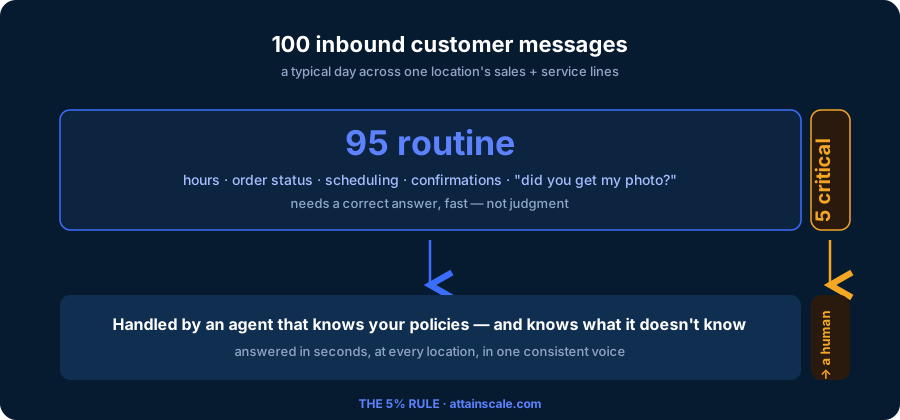
If your business looks like the hundreds of multi-location operations we’ve studied, pile two is about five percent of the stack. Maybe eight on a bad week. The rest — the overwhelming, staff-consuming, always-behind rest — needed a correct answer, quickly, in your company’s voice. It did not need Megan.
But Megan read all of it. That’s the problem.
The triage tax
Here’s the math nobody runs. If a location gets 60 inbound messages a day and a competent employee spends 90 seconds reading, deciding, and answering each one, that’s 90 minutes of pure message-handling per location per day. Across eight locations, you’re paying for 12 hours of daily triage — a full-time-and-a-half position that produces nothing but responses to questions you’ve answered a thousand times.
The hidden cost is worse than the labor. Because the 95 routine messages and the 5 critical ones arrive in the same stream, your team processes them in arrival order, not importance order. The lawyer threat from 9:40 AM sits unread behind eleven “what time do you close” messages. The six-figure buyer texts at 6:15 PM and gets the same silence as everyone else until morning. You find out about the worst ones later, from a one-star review that names an employee.
Ask your managers what actually slips. It’s never the hours question — someone always gets to that. It’s the message that needed judgment, buried in the pile that didn’t.
Why the current fixes don’t fix it
Most operators have tried some version of three things.
More people. Hiring for triage means paying judgment-level wages for lookup-level work — and every new hire answers from their own head, so now store 3 promises a discount store 7 refuses to honor. Headcount scales the inconsistency along with the coverage.
Keyword rules and auto-responders. “If message contains refund, alert manager.” Keyword triggers can’t tell “can I get a refund on shipping?” (routine) from “this is the third time, refund everything or I’m disputing the charges” (critical). So you either alert on everything — which is the same pile with extra steps — or you miss the one that mattered. And the auto-responder answering the other 95 is a template: it can’t check the order, can’t reschedule the install, can’t answer the follow-up question. Customers learn to type “agent” immediately.
A chatbot. The modern version answers more fluently, but almost every deployment we’ve seen shares two structural gaps. It doesn’t reliably know when to stop — when the conversation crossed from routine into needing a person — because “escalation” was an afterthought, a frustration keyword or a customer rage-clicking for a human. And when it gets something wrong, there’s no path for your team’s correction to change its behavior. Same mistake next Tuesday. Eventually someone with your title says “turn it off,” and everyone goes back to the pile.
The failure across all three isn’t effort or model quality. It’s that none of them treat knowing what needs a human as the core design problem. It’s the whole game.
Escalation is a judgment, not a keyword
What actually distinguishes the 5%? Not vocabulary — stakes. A message needs a human when it involves one of a small number of situations you can name in advance:
A complaint that’s escalating rather than resolving. A legal or safety threat — chargebacks, attorneys, injuries. A sales opportunity above the routine — the fleet inquiry, the multi-site contract. And the honest one: the customer asked for a person. Most businesses add two or three of their own — an at-risk order, a payment dispute, a warranty edge case.
Notice what these are: categories of risk and opportunity, each with a different right response. A complaint should page the location manager. A legal threat should silence the AI entirely and create a task for whoever handles it — the last thing you want is a bot negotiating with someone’s attorney. A sales opportunity shouldn’t interrupt anyone at 11 PM; it should be first in the queue at 8 AM.
This is what we mean by typed escalation, and it’s the design principle AttainScale is built around. Every agent knows your escalation types — the four defaults plus whatever you define — and evaluates every conversation against them, every message, in context. Each type carries its own behavior: notify (send a safe reply, flag a human) or suppress (say nothing substantive, hand it off). Every escalation automatically creates a task with an owner, because a flag nobody owns is just a notification you’ll scroll past.
The routine 95 get answered in seconds from one source of truth — your policies, your hours, the customer’s actual order — in one consistent voice across every location. The critical 5 arrive at a human with the reason attached.
What a day on the 5% looks like
Your ops manager opens the command center at 8 AM. Not 283 conversations — 26. That’s the needs-attention queue: every open escalation, every reply the AI held for review, nothing else.
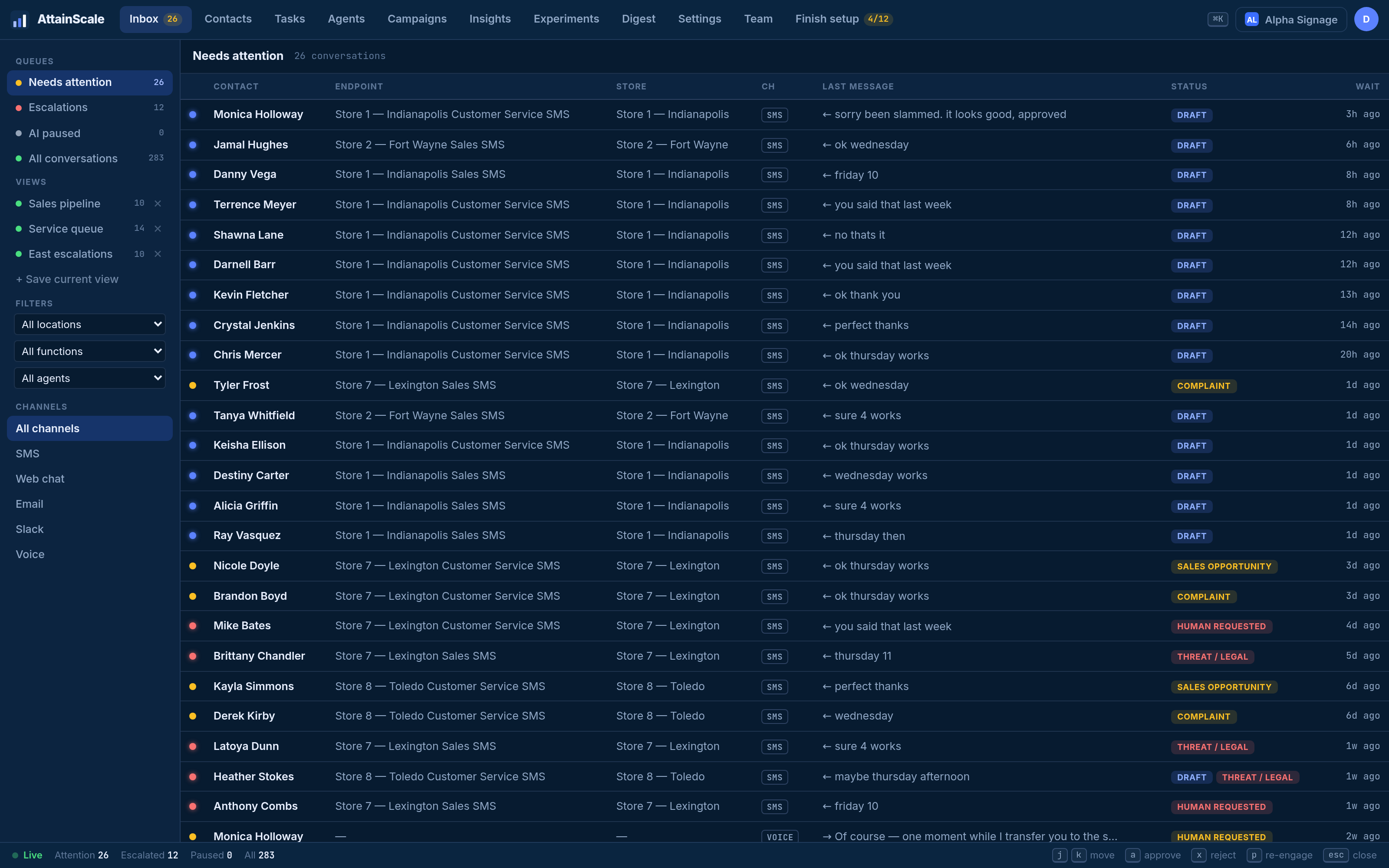
Each row says why it’s there. Three complaints, two flagged threat/legal (AI already standing down), two sales opportunities from last evening, and a stack of held drafts. She works top-down by severity, not arrival time.
The held drafts are the part most operators haven’t seen before: the AI drafted a reply but wasn’t confident enough to send it — an ambiguous refund request, a question brushing against a policy edge — so it held the message and showed its work.
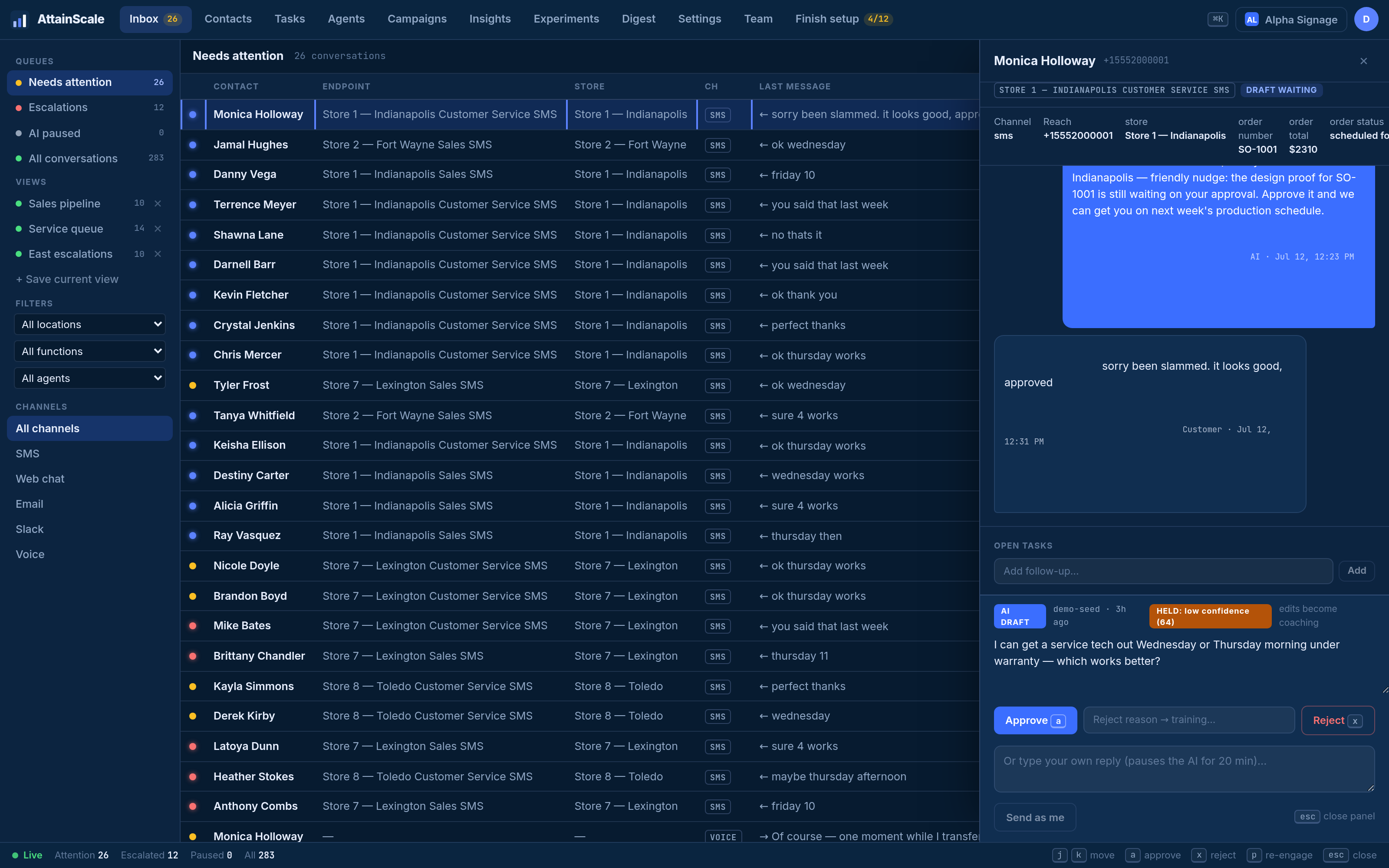
She sends most drafts untouched. One she rewrites — the customer asked to split a payment, and company policy allows it only over $500. Here’s the detail that separates a triage tool from a system that compounds: that edit is training data. Tonight it’s distilled into a proposed lesson; tomorrow she approves it in one click; from then on, every agent at every location — text, email, webchat, even the phone agent — handles split-payment requests correctly. She fixed it once. It stays fixed.
By 8:40 she’s done with messaging. Twenty-six decisions, each one worth a human’s time. The other 257 conversations never touched her morning — and she can verify that was safe, because every conversation is scored against the agent’s goal, and the insights view shows outcome trends, abandonment, and whether escalations were actually useful.
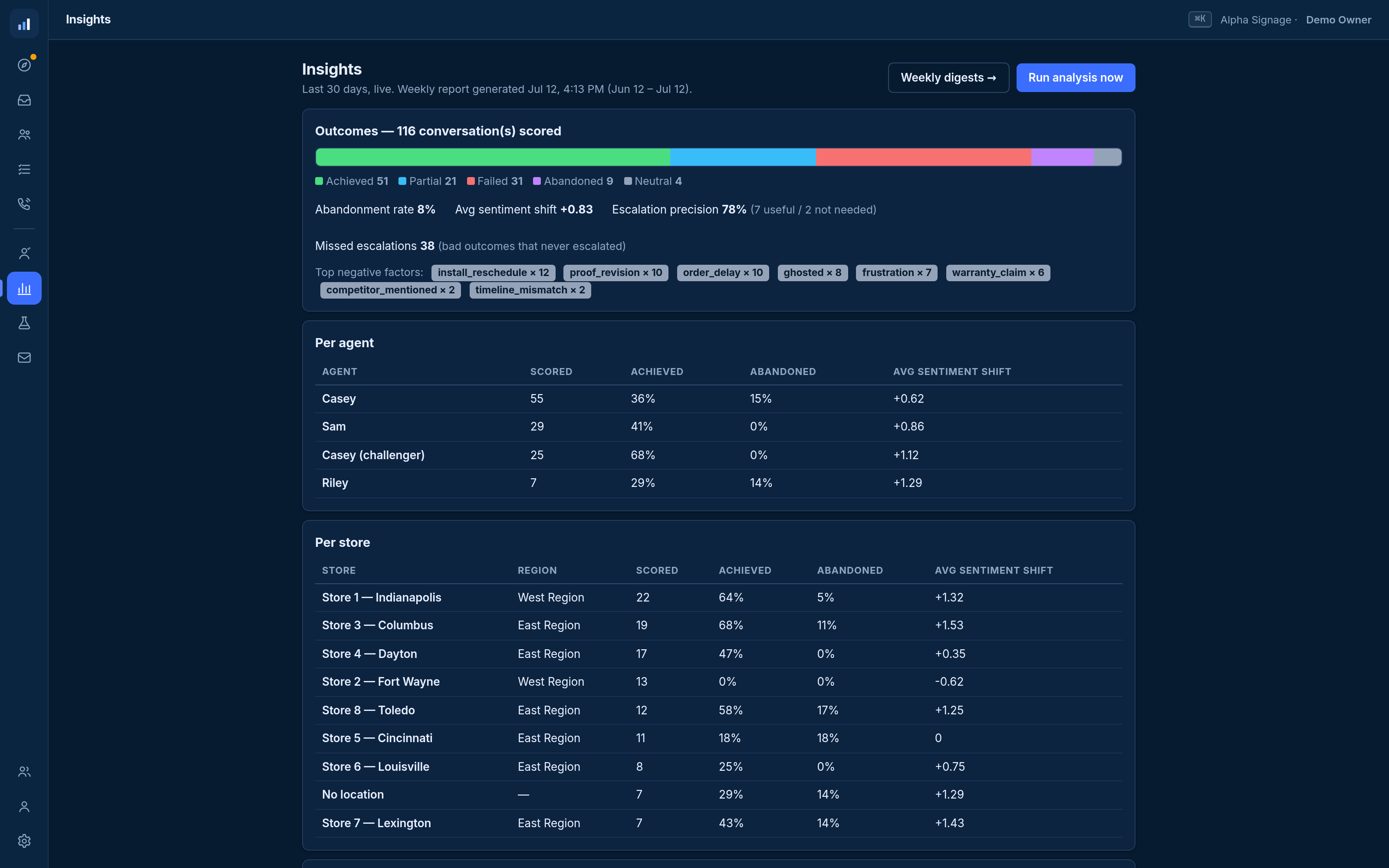
That last metric deserves a sentence. When your team resolves an escalation, they mark it resolved or not needed — two buttons. That feedback tunes the escalation triggers themselves. The 5% isn’t a static rule; it’s a boundary the system keeps sharpening, in both directions: fewer false alarms wasting your team’s attention, fewer misses where a human should have been called in.
What this doesn’t do
Honesty section, because you’ve been burned by vendor pages before.
This doesn’t eliminate the 5% — that’s the point. Your people still handle complaints, legal threats, and big deals; they just handle them sooner, with context, and without wading through the 95 to find them. It doesn’t work miracles on day one, either: the first week, your team reviews more drafts and approves more lessons, because the system is learning your policies. The payoff curve bends around week two or three as autonomy earns its way up. And if your message volume is a dozen a day at a single location, the math may not justify it yet — this is built for operators drowning in volume across locations, not for businesses that aren’t.
Run the audit
You don’t need software to test the 5% Rule — you need an hour and yesterday’s inbox. Count 100 messages. Sort them: routine (a fact you already have) versus critical (judgment, authority, empathy). Write down three numbers: your routine percentage, the response time on the critical ones, and how many critical messages were touched late because they arrived behind routine ones.
Those three numbers are your triage tax. We built a one-page worksheet that walks through the full calculation — including the labor math per location — and gives you a defensible number to put in front of whoever owns the P&L.
→ Download the Escalation-Rate Self-Audit worksheet
FAQ
What counts as a message that “needs a human”?
Anything requiring judgment, authority, or empathy: escalating complaints, legal or safety threats, high-value sales conversations, payment disputes, and any customer who asks for a person. In practice this runs 5–8% of inbound volume for most multi-location consumer businesses.
Isn’t this just a chatbot with extra steps?
The difference is structural: typed escalation (the AI evaluates every message against named risk categories with per-type behavior), confidence-gated sending (unsure replies are held, not sent), and a correction loop (your team’s edits become approved lessons applied across every channel and location). Chatbots answer; this system also knows when not to.
What happens when the AI gets something wrong?
The reply that was wrong gets edited or rejected by your team — and that correction is distilled into a proposed lesson a manager approves. The mistake becomes policy. With a static bot, the same mistake recurs until a vendor ticket fixes it.
Does this replace my staff?
It replaces the triage portion of their day — the 90 routine minutes per location. The 5% still gets human attention; it gets better human attention, because it’s no longer buried.
AttainScale is an AI operating layer for multi-location businesses: one inbox across SMS, email, webchat, and voice, agents that know when to escalate, and a learning loop that makes every correction permanent. See how the escalation inbox works →